Confirm

Designing LED Installations for University Auditoriums and Large Halls

18.03.2026

In large academic spaces, display performance is often judged too narrowly. Institutions may focus on screen size, brightness, or headline resolution, but lecture hall success usually depends on a different mix of factors: visibility from the farthest seats, integration with teaching AV systems, ease of daily use, and long-term maintainability. AVIXA’s higher education AV/IT infrastructure guidance makes this point clearly, noting that lecture halls and large classrooms require planning around room geometry, screen sizing, ceiling height, and technology infrastructure from the earliest design stage.

That matters because a university auditorium is not a stadium, a corporate lobby, or a general-purpose event venue. It has its own teaching patterns, sightline demands, hybrid-learning workflows, and operational realities. In practice, the best LED solution is rarely the biggest screen the budget can support. It is the system that helps students read content clearly, supports multiple teaching modes, and remains reliable for years of intensive use. 
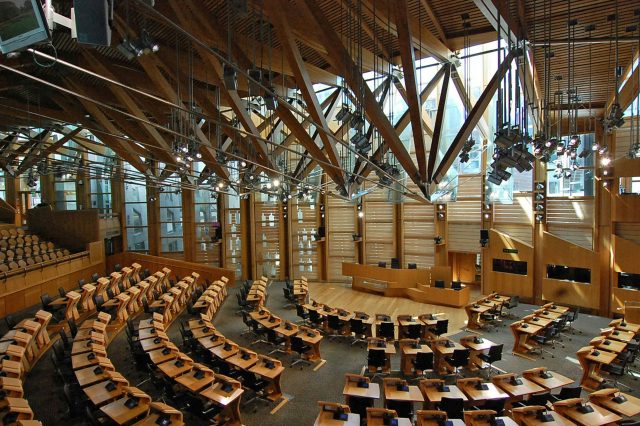
Infiled

Photo Credit © Maja R

Challenges of Large Academic Spaces

Large university auditoriums present a distinct set of design constraints. Students may be seated at very different distances and vertical angles, ceiling height may limit display placement, ambient light can vary by room design and time of day, and teaching formats may shift between lecture delivery, panel discussion, video playback, guest presentations, and hybrid instruction. AVIXA’s higher education infrastructure guide specifically highlights the importance of sufficient ceiling height and early architectural coordination for large teaching spaces, because screen effectiveness is heavily tied to room planning, not just display specification.

Another challenge is that academic content is usually more demanding than simple video playback. A university display may need to show lecture slides, spreadsheets, equations, detailed diagrams, video clips, camera feeds, and remote participants, sometimes within the same session. That means legibility is critical. If the farthest seats cannot read a chart axis, formula, or annotation, the system is underperforming regardless of how visually impressive it looks from the front rows. AVIXA’s DISCAS guidance exists for exactly this reason: display image size must be matched to actual content needs and viewing conditions so people can read and interpret what is shown.

There is also a usability challenge. In many institutions, the people using the room every day are not AV engineers. Faculty members, guest speakers, and support staff need systems that behave predictably, switch sources easily, and do not require complex workarounds. EDUCAUSE’s work on hybrid teaching environments stresses that successful learning spaces keep technology simple and aligned with teaching activity rather than making the room harder to operate.

Viewing Distance, Pixel Pitch, and Layout

Viewing distance is one of the most important variables in auditorium LED design. A display that looks sharp at the front of the room may not be the right choice for the back row, and the reverse is also true. Pixel pitch needs to be evaluated in relation to audience distance, content type, and the role of the screen. AVIXA notes a commonly used rule of thumb that every 1 mm of pixel pitch corresponds to about 10 feet of optimal viewing distance. While this is not the only method, it is a useful starting point for estimating whether a display is appropriate for the room.

In universities, this becomes especially important because educational content often includes fine detail. A presentation-heavy auditorium showing dense text and diagrams may need a finer pitch and more careful layout than a hall used mainly for ceremonies or general video support. Pixel pitch should therefore be chosen according to the most demanding routine use case, not the least demanding one. If the institution expects students to read detailed lecture content from the upper rows, screen specification has to support that requirement. AVIXA’s DISCAS calculator and related guidance are useful because they focus on readable image sizing instead of purely aesthetic sizing.

Layout matters just as much as pitch. The display has to sit within a visual field that works for both the front rows and the rear seats without forcing awkward neck angles or conflicting with stage sightlines. AVIXA’s higher education guidance points to room dimensions and height as core planning inputs, which is especially relevant in steep lecture halls where the vertical relationship between stage, display, and audience can make or break the learning experience.

This is also why screen size alone is a poor decision framework. A large wall with the wrong placement or the wrong pitch can underperform compared with a better-matched system. INFiLED’s relevance in this type of project should be tied to system fit: choosing a display solution that supports the actual teaching distances, content demands, and room geometry rather than maximizing headline size for its own sake.

Integration with Audio-Visual Systems

An auditorium LED wall has to work as part of a complete AV ecosystem. In higher education, that usually includes lecture capture, switching and routing, microphones, loudspeakers, control systems, presenter connectivity, document cameras, streaming platforms, and sometimes conferencing tools for remote participation. AVIXA’s higher education AV/IT guidance treats this infrastructure holistically, which is the right approach because the display is only one component in a larger instructional environment.

This integration requirement has become more important as hybrid and flexible teaching models expand. A room may need to support local presentation, remote guest participation, live recording, and real-time collaboration within the same session. EDUCAUSE’s analysis of hybrid teaching environments emphasizes that space design should support communication clearly and reduce complexity for instructors. In practical terms, that means the LED system should be easy to integrate with source switching, room controls, camera workflows, and any collaboration platforms already used by the institution.

Audio-visual coordination also affects the room experience more broadly. AVIXA’s needs-assessment guidance highlights factors such as lighting, acoustics, power, and ventilation as part of display planning. In auditoriums, lighting conditions can affect perceived screen performance, while acoustics and speaker placement influence whether the room feels coherent during lectures, multimedia playback, or hybrid sessions. The display cannot be designed in isolation from those conditions.

Operational support is another integration issue institutions often underestimate. AVIXA’s explanation of AV support makes clear that planning, operation, maintenance, and network integration are all part of delivering a usable system. Universities should therefore ask not only how the LED wall will be installed, but also how it will be supported, monitored, updated, and serviced over time.

Content Use Cases in Education

University auditoriums serve more than one kind of content, and that has direct implications for LED design. The most obvious use case is lecture presentation, where the system must support clear slide display, readable text, and stable rendering of diagrams and charts. But many institutions also use large halls for guest talks, conferences, ceremonies, research showcases, student presentations, livestreamed events, and mixed-format hybrid sessions. EDUCAUSE’s long-running work on learning spaces shows that educational environments increasingly support multiple modes of teaching and engagement rather than one fixed model.

That variety means institutions should define the dominant content types early. A hall used mainly for keynote-style presentations may prioritize different performance criteria than one used for technical instruction with detailed on-screen content. Likewise, a room that frequently supports hybrid participation may need stronger emphasis on camera framing, confidence monitoring, and integration with teaching platforms. EDUCAUSE’s hybrid and active-learning work suggests that the best-performing spaces are designed around how people actually teach and learn in them, not around a generic “technology upgrade” mindset.

There are also non-instructional use cases worth planning for. Universities often use auditoriums for orientation sessions, alumni events, donor presentations, public programming, and campus-wide announcements. In some cases, large-format visual systems near common areas also support broader communication and signage functions, something AVIXA has noted in higher education technology adoption.

The design takeaway is straightforward: institutions should not ask only whether the wall looks impressive. They should ask what range of educational and institutional use cases it needs to support consistently, and whether the chosen specification helps each of those uses perform well.

Long-Term Value vs Traditional Solutions

One of the most important buying questions is not whether LED can work in a university auditorium, but when it provides better long-term value than more traditional display approaches. In many large halls, projectors have historically been the default. They can still be viable in some cases, but their performance depends heavily on throw distance, ambient light, room geometry, lamp or light-source maintenance, and screen conditions. AVIXA’s projector guidance shows how throw requirements and space constraints directly affect suitability, which is especially relevant in deep or architecturally constrained auditoriums.

LED systems can offer advantages in brightness consistency, seamless large-format presentation, and reduced dependence on projection geometry. But the real value case should be framed around educational usability and lifecycle performance, not around novelty. If a university gains better legibility in bright spaces, more flexible room layout, simpler hybrid integration, and stronger long-term operational reliability, then LED may justify its cost more convincingly. AVIXA’s AV support and performance-verification resources reinforce that value should include operation, verification, and maintainability rather than just first-cost comparison.

Institutions should also consider how teaching expectations evolve. Higher education spaces increasingly need to support flexible learning models, digital content richness, and more integrated instructional technology. EDUCAUSE’s work on hybrid and active-learning spaces suggests that long-term value often comes from designing for adaptability rather than optimizing too narrowly for a single present-day use case.

This is where a manufacturer such as INFiLED should be evaluated thoughtfully. The question is not whether LED is inherently premium, but whether the solution supports years of educational use, aligns with the institution’s AV ecosystem, and avoids creating a high-spec system that becomes difficult to operate or maintain.

Common Mistakes in Auditorium Design

A common mistake is choosing screen size before defining content and readability requirements. This often leads to a visually dominant installation that still fails to serve the students in the back rows. AVIXA’s display-sizing and higher education design guidance both point in the opposite direction: start with viewing needs, room dimensions, and content type, then size the system accordingly.

Another mistake is underestimating integration complexity. A university auditorium is not just a room with a screen. It is a teaching system. If the LED wall is not planned alongside switching, control, lecture capture, audio, and hybrid tools, usability problems usually show up after installation rather than before. EDUCAUSE’s hybrid-space design principles make this especially clear by emphasizing simplicity, connection, and activity-based design.

A third mistake is evaluating performance from the front of the room instead of from the real audience positions. Institutions should test concepts against the farthest seats, upper rows, and off-axis viewing positions because those conditions reveal whether the design actually works for the room. A fourth mistake is ignoring operational support. If faculty need extensive training to do basic tasks, or if maintenance access is difficult, the system’s real educational value drops quickly. AVIXA’s AV support guidance underlines that installation is only one part of long-term success.

Designing LED installations for university auditoriums and large halls is ultimately a visibility and usability challenge more than a simple hardware decision. The most successful systems are the ones that match pixel pitch to viewing distance, fit naturally into the room layout, integrate cleanly with teaching AV infrastructure, and continue delivering value over years of academic use. In higher education, that is what makes the difference between a screen that looks impressive and a system that genuinely improves the learning environment. 

User registration
Join us to download our content. It only takes a moment!

    I have read and accept the privacy policy

    This site is protected by reCAPTCHA and Google.

    It looks like you are visiting the website from
    Select your region: