Confirm

LED Volume Setup: What It Takes to Build a Virtual Production Stage

27.03.2026

An LED volume is often described as an LED wall for virtual production, but that description is too narrow. A working volume is really a synchronized production system that combines LED displays, real-time rendering, camera tracking, playback and processing, genlock, timecode, and color-managed workflows into one environment. Epic Games describes in-camera VFX as shooting real-time visual effects during live action production with an immersive LED volume, and its documentation makes clear that the system depends on more than the screen itself.

That is why many first-time buyers misjudge where success comes from. The LED panels matter, but a virtual production stage succeeds or fails based on integration, latency control, sync discipline, content preparation, and on-set workflow. SMPTE’s on-set virtual production initiative and color-management materials both reflect how many departments and technical layers have to work together to make an LED volume perform reliably on set.
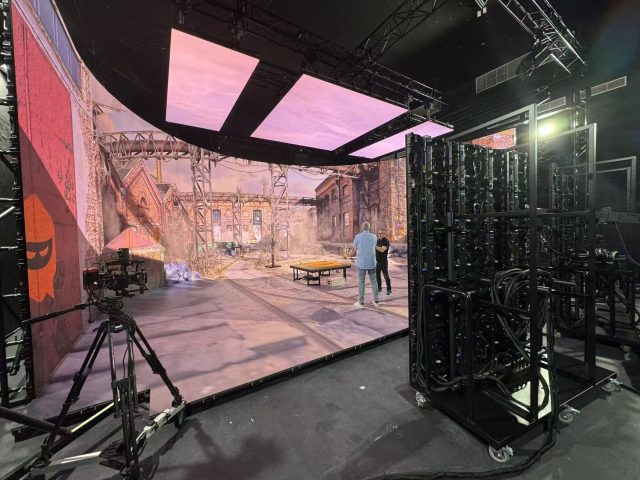
Infiled

Photo Credit © Web3 Studio

What Is an LED Volume and How It Works

An LED volume is a controlled shooting environment in which LED walls, and often a ceiling, display real-time or pre-rendered backgrounds that interact with the camera and the physical set. In an in-camera VFX workflow, the rendered image changes in perspective based on the camera’s position, so the background behaves like a believable extension of the set rather than a flat playback surface. Epic’s Unreal Engine documentation explains this through nDisplay, frustums, and the relationship between the render cluster and the topology of the LED volume.

The key concept is that only part of the wall is rendered for the active camera view at the highest priority. That “inner frustum” tracks the camera and provides the perspective-correct image seen through the lens, while the wider visible environment helps create lighting, reflections, and background continuity for the rest of the stage. This is why a volume is different from a conventional video wall. It is not just displaying content. It is participating in the photographic process.

In practice, this means the volume has to behave like part of the camera system. If tracking drifts, sync slips, or color is inconsistent, the illusion breaks quickly. That is also why experienced teams define the stage as a workflow platform, not just a display purchase.

Core Components of a Virtual Production Setup

The most visible component is the LED wall itself, including panels, processing, mounting structure, and often a ceiling or additional return walls. But Epic’s recommended hardware guidance makes clear that an Unreal-based in-camera VFX setup also needs multiple machines working together in an nDisplay cluster to drive the volume.

A real production stage also typically includes a real-time rendering engine, a media server or playback layer where relevant, camera tracking, lens data, a switching and routing layer, synchronization infrastructure, stage control, and monitoring for the operator, DP, DIT, and virtual art department. ARRI’s synchronization guidance and virtual production FAQ both emphasize that the camera must be synchronized with the LED wall and related third-party devices from a shared reference source.

Camera tracking is another foundational layer because the rendered perspective depends on accurate position and lens information. Without stable tracking and lens metadata, the parallax effect that makes the background feel real will not hold up consistently. On top of that, the stage needs a color pipeline that keeps the camera, render engine, LED wall, and grading expectations aligned, which SMPTE specifically highlights as a major concern in on-set virtual production.

This is where buyers should think carefully about system ownership. A virtual production stage is not only an LED project, not only a camera project, and not only a render project. It is all three at once. INFiLED can be relevant as part of the display layer, but the business case only works when the full system stack is planned as one environment rather than a set of loosely connected components.

Pixel Pitch and Camera Interaction

Pixel pitch is one of the first technical decisions buyers focus on, and for good reason. Epic’s documentation defines pixel pitch as the density of pixels in the LED cabinet and its relationship to overall resolution, typically measured in millimeters between LEDs. In a virtual production stage, that directly affects image detail, wall resolution, and camera behavior.

But pitch selection is not just about sharper-looking panels. It affects moiré risk, camera distance, lensing choices, and depth-of-field strategy. Sony’s VENICE 2 manual includes a moiré alert for virtual production shooting, and Sony’s toolset announcement specifically notes moiré alerts based on wall pixel pitch and related specifications. That reflects a real production challenge: if the camera resolves the LED pixel structure too clearly, the image can break down on screen.

Teams often manage this through a combination of pitch choice, camera distance, lens selection, sensor format, focus strategy, and stage blocking. RedShark’s practical guidance, while not a primary standards source, reflects common production wisdom that shallower depth of field and sufficient distance from the wall help reduce visible pixel structure and moiré.

The important point for buyers is that pitch cannot be chosen in isolation. A wall that seems cost-effective on paper may become restrictive if it forces more distance than the stage can accommodate or creates limitations for intended focal lengths and shot design. In virtual production, pitch is a workflow variable as much as a display variable.

Synchronization with Cameras and Rendering Engines

Synchronization is one of the least glamorous parts of an LED volume build, but it is one of the most important. ARRI’s technical guidance states that to synchronize a camera with an external device such as an LED wall processor, all devices must be synchronized to one another, typically through trigger signals from a single master or studio clock. ARRI also notes that several of its cameras can accept and synchronize to tri-level or black burst genlock.

In a functioning volume, the render engine, LED processing chain, and camera system all need tight timing alignment. Otherwise, productions can run into tearing, scan artifacts, exposure mismatches, or timing instability that becomes visible in-camera. Epic’s in-camera VFX best-practices guidance and nDisplay documentation reinforce that Unreal-based volume work depends on coordinated cluster behavior and carefully managed settings across the render environment.

Rendering performance matters just as much. If the scene is too heavy, or the render pipeline is not optimized for the stage, framerate consistency and latency become problems. Epic’s documentation on recommended hardware and best practices exists largely because virtual production places unusual demands on multiple systems communicating in real time.

Color synchronization is part of this too. SMPTE’s virtual production color-management materials stress that cameras, LED displays, rendering engines, and lighting objects all interact on set, making color control essential if productions want to avoid expensive fixes later in post. A good volume does not just sync time. It also syncs color expectations and exposure behavior across the pipeline.

Common Setup Challenges and Mistakes

One common mistake is assuming that once the wall is installed, the stage is basically ready. In reality, the wall is only one layer. Many issues emerge later in tracking stability, camera sync, scene optimization, color pipeline alignment, or on-set control workflows. SMPTE’s OSVP initiative exists in part because the industry needed clearer shared practices for exactly these multi-department challenges.

Another mistake is treating pixel pitch as a prestige spec instead of a stage-planning variable. Buyers can overspend on pitch where it is not needed, or underspec it in ways that create moiré and shot-design limitations. The right decision depends on the intended camera package, stage dimensions, framing style, and expected creative use.

A third mistake is neglecting content readiness. A volume cannot rescue weak assets, poorly prepared environments, or scenes that are not optimized for real-time rendering. Unreal’s in-camera VFX materials repeatedly emphasize configuration, content setup, and operator tooling because virtual production depends on preparation long before the shoot day.

There is also a workflow mistake that shows up often: not deciding early enough who owns the stage during production. If responsibilities are blurry between the VP supervisor, stage operator, DP, DIT, VAD, and engineering team, troubleshooting slows down fast. This is one reason mature facilities treat the stage as an operational discipline, not only an installation.

Key Considerations Before Investing

Before investing in an LED volume, buyers should first decide what type of production the stage is meant to support. A facility built for high-end in-camera VFX on drama and commercials may need different pitch, height, curvature, tracking, and render capacity than a stage optimized for automotive, tabletop, broadcast, or education use. Epic’s hardware and workflow materials make clear that stage configuration should follow production goals, not the other way around.

The second consideration is whether the organization is buying infrastructure or buying capability. Hardware can be purchased, but stage performance depends on trained operators, calibrated workflows, tested sync, and repeatable content pipelines. SMPTE’s work on on-set virtual production and color-managed workflows points directly to this operational maturity requirement.

The third consideration is scale. Bigger is not automatically better. A larger volume increases cost, render demand, structural needs, and operational complexity. The right size is the one that supports the intended shot language and production model without creating unnecessary overhead. INFiLED, or any LED partner, is most valuable here when the discussion stays grounded in stage use, camera interaction, and long-term workflow reliability rather than just wall dimensions.

An LED volume is ultimately a systems project. The panels matter, but they are only one part of a tightly coordinated environment that includes rendering, synchronization, tracking, color management, and stage operations. The productions that get the best results are usually the ones that understand this early and invest accordingly. 

User registration
Join us to download our content. It only takes a moment!

    I have read and accept the privacy policy

    This site is protected by reCAPTCHA and Google.

    It looks like you are visiting the website from
    Select your region: