Confirm

LED vs Projector vs LCD: What’s Best for Modern Lecture Halls?

14.02.2026

Modern lecture halls are no longer single-purpose rooms. They host in-person teaching, recorded sessions, hybrid classes, guest speakers, and occasional events. That pushes display decisions beyond simple size and price.

The most common mistake is treating “bigger image” as the goal and choosing purely on headline specs like lumens, screen size, or a resolution label. In practice, the best choice depends on how readable content is from the back row, how well the image holds up under ambient light, how the system behaves for cameras, and how much operational effort it takes to keep performance consistent over years.
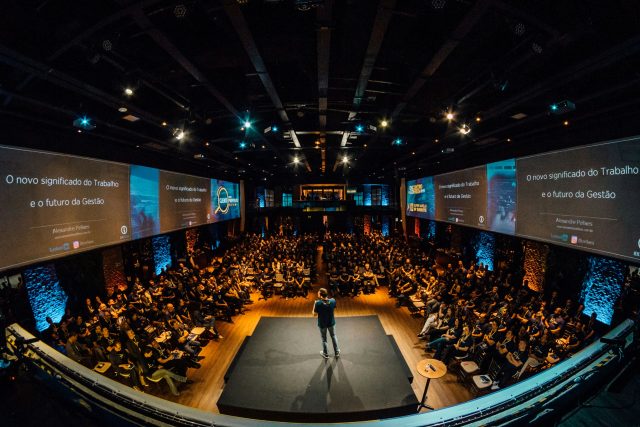
Infiled

The Three Display Options (And the Metrics That Mislead Buyers)

In lecture halls, the three common display approaches are:

Projection (laser or lamp) + screen
A projector outputs light measured in lumens onto a reflective surface. The real success metric is not lumens alone, but usable contrast in the room’s ambient light. AVIXA’s Projected Image System Contrast Ratio method is widely used for thinking about this trade-off, and Draper’s tool is a practical explainer.

LCD flat panels (single large format display)
A direct-view display measured in nits (screen luminance). LCD delivers strong perceived contrast in brighter rooms, but size, mounting, and sightlines become limiting in large lecture halls.

Direct-view LED wall
A modular surface built from cabinets and modules. Instead of lumens, performance is discussed in brightness (nits), pixel pitch, and uniformity. The key lecture-hall variable is pixel pitch relative to viewing distance and small-text readability, not “how big it can get.”

Across all three, decision-making should emphasize: viewing distance, ambient light, content type (text-heavy vs video), camera use, color accuracy and calibration behavior, and maintenance model.

What Actually Breaks Performance in Real Lecture Halls

The same lecture hall can make one technology look excellent and another look mediocre, even if both are “high-end,” because room constraints dominate.

Projection: contrast is the real bottleneck

Projectors are often selected by lumens, then disappointed by washed-out black levels when lights are on. Lecture halls frequently require some lighting for note-taking, safety, and visibility of the instructor. In that environment, the limiting factor is contrast at the screen, not peak brightness.

Common real-world constraints include:

  • Ambient light spill onto the screen from aisle lights, wall wash, and windows
  • Screen gain and hotspotting if higher-gain materials are used to compensate for brightness
  • Shadowing and glare depending on projector placement and lecturer movement
  • Color and brightness drift over time, especially if maintenance cycles are not enforced

If the room must regularly run with lights on, a projection system can still work, but the design needs to start with contrast targets, screen material, and lighting control, not just a lumen number.

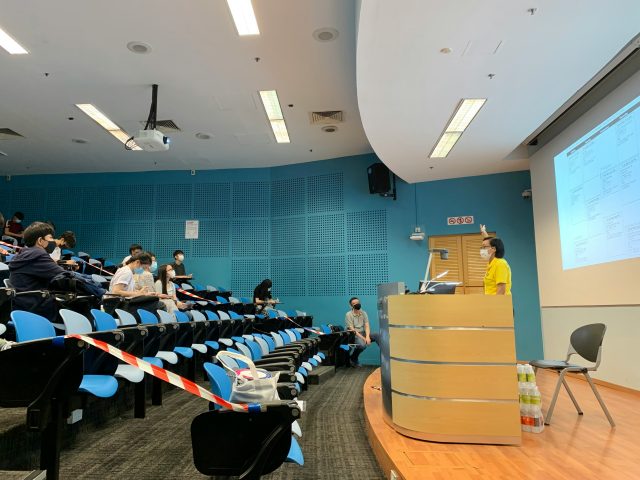
Infiled

Poor contrast at the screen via projector.

LCD: great clarity, but limited scale and sightlines

Large LCDs deliver strong perceived contrast and crisp text, especially for slide decks, code, and detailed UI. The issues appear as room size increases:

  • Size ceiling: one display rarely scales to true “back row legibility” in large halls without becoming physically and structurally challenging
  • Mounting height and sightlines: the lower edge can be blocked by heads in steep-rake seating, or mounted too high for comfortable viewing in the front rows
  • Reflections: glossy surfaces and room lighting can introduce mirror-like glare

LCD is often an excellent fit for smaller lecture rooms and mid-size spaces, but it becomes a compromise when the hall is wide, deep, or used for hybrid teaching with camera capture.

LED: scalable, but readability and acoustics must be designed, not assumed

LED walls solve scale and brightness in a way LCD and projection often cannot. But lecture halls introduce two “gotchas” that are frequently underestimated:

  1. Pixel pitch and text readability
    If the wall is used for dense content (slides with small text, spreadsheets, code, detailed diagrams), pixel pitch must be selected for the closest critical viewing distance and the smallest text that must be read. A wall that looks impressive for video can still be a poor teaching display if pixel structure softens text edges.
  2. System integration and room behavior
    LED walls are modular systems. Long-term performance depends on calibration workflows, spare strategy, and how service swaps affect uniformity. For lecture halls that run daily schedules, serviceability and predictable image consistency matter more than “max brightness” claims.

Choosing by Use Case: Text, Light, Cameras, and Total Cost

A reliable decision comes from mapping the technology to teaching behavior, room geometry, and operational ownership. The comparison below uses the lens of LED vs projector vs LCD for lecture halls.

If the room is mostly text, charts, and desktop sharing

  • Best fit often favors LCD or fine-pitch LED, depending on room size.
  • Projection can work, but only if lighting control is strong and contrast planning is done properly.

This is where viewing distance standards help avoid under-sizing. Many higher-ed AV standards documents explicitly reference AVIXA sizing approaches for determining display size relative to room layout.

If the room must run with lights on, windows open, and minimal “show mode”

  • LCD and LED maintain perceived contrast more predictably than projection in bright conditions.
  • For projection to compete, it typically needs tighter control of ambient light at the screen, careful screen selection, and sufficient brightness headroom without creating hotspotting.

A useful way to think about human vision and perceived image quality is the long-standing InfoComm paper on display specs and human vision, which explains why contrast and luminance relationships matter as much as resolution labels.

If hybrid learning and camera capture are routine

Hybrid lecture halls introduce camera-facing constraints:

  • Projection can look fine to the audience but appear flat on camera if contrast is weak.
  • LED and LCD can produce camera artifacts if processing, refresh behavior, and shutter interactions are ignored.

This does not mean one technology “wins” by default. It means camera testing should be part of acceptance, and processing should be chosen for stable output timing and predictable scaling.

If total cost of ownership matters more than purchase price

This is where LED vs projector vs LCD decisions often flip after year one.

  • Projection: recurring cost includes filters, alignment checks, and brightness drift management.
  • LCD: low routine maintenance, but replacement can be “all-at-once” when size or lifecycle limits are hit.
  • LED: serviceable by module, but requires a calibration and spares policy to keep uniformity consistent after repairs.

INFiLED projects in education-like environments typically go better when the buyer treats calibration, spares, and service access as part of the system design, not as afterthoughts, because that is what keeps image consistency stable across semesters.

A decision framework that avoids the common lecture hall mistakes

Step 1: Define the “worst seat” and the smallest critical content

Pick the farthest seat that still needs to read key content and the closest seat that will notice pixel structure or discomfort. Then test typical content: slide templates, equations, code, and UI dashboards. This step is what turns LED vs projector vs LCD from opinion into engineering.

Step 2: Decide how the room will actually be lit

If the room will frequently run with lights on, projection must be engineered around contrast targets using tools like PISCR, while LED and LCD must be checked for reflections and comfortable brightness at the front rows.

Step 3: Treat processing and scaling as part of the display choice

Lecture halls suffer when scaling is poor: soft text, inconsistent aspect ratios, and awkward switching. The display can be excellent and still fail if the signal chain is not designed for teaching workflows.

Step 4: Assign ownership and define maintenance behavior

Who controls brightness presets, schedules, content playback, and fault escalation? Without a clear owner, settings drift and image quality complaints become constant, regardless of technology.

Pick the Technology That Stays Readable All Semester

For modern lecture halls, LED vs projector vs LCD is not a simple “best technology” decision. Projection remains compelling where very large images are needed and the room can control light well enough to protect contrast. LCD is strong for crisp text and straightforward operation, especially in smaller to mid-size spaces where scale is manageable. LED walls become attractive when the hall needs large-scale visuals, higher ambient-light resilience, and consistent visibility, but only when pixel pitch, calibration practices, and service planning are treated as core requirements. INFiLED’s engineering-first approach aligns with that reality: choosing the right display means optimizing for readability, room behavior, and maintainability, not headline specs.

User registration
Join us to download our content. It only takes a moment!

    I have read and accept the privacy policy

    This site is protected by reCAPTCHA and Google.

    It looks like you are visiting the website from
    Select your region: