Confirm

Retail LED Displays That Drive Sales: Design Strategies & Real Use Cases

18.02.2026

Retail LED displays are often purchased like “visual upgrades,” then deployed like digital wallpaper. The result is predictable: beautiful motion content that shoppers ignore, screens placed where no buying decision happens, and a store team that cannot keep content current. The core misunderstanding is thinking the display itself drives sales. In reality, retail LED displays only perform when they support a specific shopper behavior: stopping, orienting, comparing, trusting, and deciding.

That means design is not primarily about pixel pitch or nits. It is about where the screen sits in the journey, what it communicates in two seconds, and how it connects to products and staff workflows.
Infiled

Retail LED Displays as Conversion Tools (Not “Visual Upgrades”)

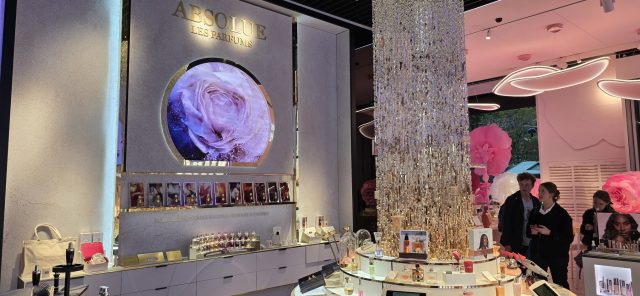
Retail LED displays are direct-view LED surfaces used in stores to deliver high-brightness, large-format visuals. They can be a hero wall in the entry, a feature-zone backdrop, a window-facing display, or a wayfinding and promo system across departments. Unlike LCD signage, LED walls scale architecturally, tolerate higher brightness in demanding light, and can become part of the store’s identity.

The fundamentals that matter for conversion outcomes:

  • Role in the path to purchase: attraction (pull people in), orientation (help them navigate), persuasion (help them choose), reassurance (reduce risk), or uplift (increase basket size).
  • Message latency: how quickly the shopper “gets it.” Retail LED displays usually have 1–3 seconds to communicate the point.
  • Legibility under real lighting: window glare, spotlights, and shiny fixtures change perceived contrast. Brightness is only helpful if content is designed for it.
  • Content-to-product distance: the closer the screen is to the product decision, the more directly it can influence conversion.
  • Operational ownership: who updates content, how often, and what triggers changes (inventory, promotions, time of day).

Field research and experiments consistently show that in-store screens can affect shopper attention and outcomes, but only when they are deployed as part of the shopping environment, not as isolated media. For example, a large-scale field experiment study of in-store digital signage campaigns highlights measurable behavioral and performance effects across many campaigns and shoppers.

How Screens Actually Influence Sales: Attention, Movement, Confidence

Retail LED displays influence sales through a chain of effects. The display rarely creates conversion directly. It changes what people notice, where they move, and what they feel confident buying.

Attention is won by contrast and relevance, not motion

A common failure mode is using high-motion brand reels everywhere. Motion attracts glance-level attention, but it does not automatically convert. In stores, attention is selective and task-driven. If content does not answer an immediate question, shoppers tune it out.

High-performing retail LED displays tend to do one of these:

  • Solve a decision: “Which model fits my use case?”
  • Reduce friction: “Where do I go for returns, pickup, or help?”
  • Make value obvious: “Why this product is worth the price today”
  • Build trust fast: “Proof, warranty clarity, compatibility, sizing guidance”

Academic research on digital point-of-sale communication also shows that message framing and shopper distance to purchase can change effectiveness, which is why content that works at entry may fail in aisle.

Placement controls what the screen can influence

Retail LED displays in the wrong location become expensive ambience. A useful placement rule is to match screen location to the decision stage:

  • Entry and decompression zone: orient, set context, guide flow.
  • Feature zones: simplify choice, highlight hero products, reduce uncertainty.
  • Comparison zones: explain differences, show bundles, answer “why this one.”
  • Queue and service areas: reduce perceived wait time, educate, cross-sell.

NielsenIQ has noted how retailers use digital signage to engage shoppers and reduce perceived wait time at checkout, which is a practical example of screens supporting a behavioral goal rather than “branding.”

Brightness and color stability matter most in windows and mixed lighting

Retail lighting is uneven: windows, spotlights, reflections, and bright product packaging all compete. Retail LED displays need brightness headroom in window-adjacent or sunlit areas, but “run it at maximum” usually backfires by washing out detail and making faces and product textures look harsh.

A practical approach is to treat brightness as a controlled operating range and design content to hold contrast at that range. Rules of thumb for matching display brightness to ambient light are widely discussed in digital signage practice.

Use Cases That Map to Shopper Decisions and Store Outcomes

If the goal is conversion, retail LED displays should be specified and designed backward from shopper behavior.

Use case 1: Entry hero wall that increases store penetration

Goal: pull people deeper into the store, not just impress them at the door.

What works:

  • simple “what’s in here” storytelling (category cues, not brand cinema)
  • directional prompts that match store layout
  • time-based content that changes by daypart (commute, lunch, evening)

Common mistake: high-production brand reels that do not connect to the actual merchandise mix in the first 20 meters.

Use case 2: Feature-zone backdrop that lifts attachment rate

Goal: increase add-ons and higher-margin choices in a curated zone.

What works:

  • showing a complete “solution,” not a single product
  • clear bundling logic (what goes together, why it matters)
  • short proof cues (warranty, fit guarantee, service promise)

This is where an engineering-led LED partner can help, because the wall is part of the fixture design. INFiLED projects in retail tend to perform better when content legibility, reflections, and servicing access are considered during architectural planning, not after the build.

Use case 3: Comparison content near high-consideration products

Goal: help shoppers choose faster, with fewer drop-offs.

What works:

  • a 3-option comparison framework: good, better, best
  • “choose by use case” prompts (commute, running, office, travel)
  • sizing and fit guidance that reduces returns
  • compatibility info for electronics, accessories, and systems

Retail LED displays are especially effective here because the screen can be large enough to show structured comparisons that would be unreadable on small signage.

Use case 4: Queue and service-zone screens that protect conversion

Goal: reduce frustration and capture last-minute adds.

What works:

  • clear steps for pickup, returns, and service
  • “while you wait” bundles tied to the queue location
  • staff amplification: showing what to ask for, not just what to buy

Mistake: repeating entry content at checkout. The shopper’s mental task has changed.

Use case 5: Window-facing LED that drives footfall without annoying passersby

Goal: stop people long enough to enter, without looking like a nightclub.

What works:

  • low-frequency motion, high-contrast product storytelling
  • limited text, large type, strong category cues
  • brightness profiles that respect time of day

For window use, it is worth treating brightness and reflections as a system constraint, including how content looks in direct sun versus evening glass reflections.

Design strategies that reliably convert

Build content around micro-decisions

Retail LED displays convert when they answer micro-decisions quickly:

  • “Is this for me?”
  • “Is this in stock?”
  • “What do I need with it?”
  • “What is the difference between these two?”
  • “Can I trust the quality and support?”

This is why content length matters. If the screen needs 15 seconds to land the message, it will underperform in most retail traffic patterns.

Use a two-layer content structure

High-performing retail LED displays often use:

  1. Instant layer: a single clear proposition that lands in 2 seconds
  2. Support layer: proof, comparison, or context that rewards longer dwell time

This design keeps the screen useful for both fast walkers and engaged shoppers.

Treat calibration and consistency as brand protection

Retail is unforgiving about inconsistent color and brightness. A patchy wall damages perceived quality. If the wall will run long hours, buyers should plan spares, calibration workflows, and service access so module replacement does not leave visible seams. This is one reason INFiLED avoids treating retail as “just signage” and instead approaches it as a maintainable visual system with defined operational routines.

Build Around Behavior, Then Make the Tech Disappear

Retail LED displays drive sales when they are designed around the store’s decision moments, not around technology headlines. The display should have a defined job in the shopper journey, content that communicates in seconds, and placement close enough to influence real choices. Brightness and visibility should be managed as operating ranges matched to lighting, and content should be built to hold contrast and legibility in those conditions. The strongest outcomes come from system-level thinking: fixture integration, service access, calibration consistency, and a content workflow that the store can sustain. When that foundation is in place, retail LED displays become more than visual decoration, and partners like INFiLED can focus on reliability and real-world performance instead of spec-sheet theater.

User registration
Join us to download our content. It only takes a moment!

    I have read and accept the privacy policy

    This site is protected by reCAPTCHA and Google.

    It looks like you are visiting the website from
    Select your region: