Confirm

Transparent LED Stage Design: How to Layer Screens Without Blocking the Show

21.09.2026

Search results for transparent LED are mostly product pages and image galleries. They show what the screen looks like in a photo, but they rarely explain how transparent LED stage design works when a real show has performers, moving lights, cameras and a rigging plan to fit around it.

The common misunderstanding is that transparent means invisible. A transparent screen is still an object in the room. It has structure, it reflects and scatters light, and it changes how both the audience and the cameras see everything behind it. Used well, it adds depth and lets the stage stay alive behind the visuals. Used badly, it dims the performers and muddies the lighting. This guide explains how to layer screens, choose transparency and plan curves and rigging so the screen supports the show instead of competing with it.
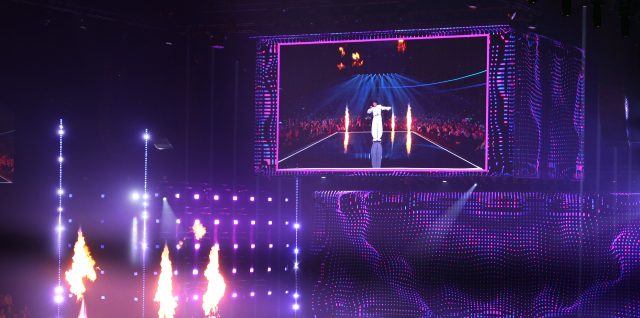
INFiLED ARmk2 and AMT Series LED screens on the UMK2026 stage in Finland

ARmk2 upstage screen at UMK2026 in Finland. Photo: Akun Tehdas.

What Transparent LED Actually Does on a Stage

Transparent LED places the light-emitting elements on thin strips or narrow modules with open space between them. The image is built from those points, and the gaps let the audience see through to whatever sits behind the screen. The trade-off is direct: more open space means better see-through, but fewer pixels per square metre, which lowers image density at the same viewing distance.

For stage work, that trade-off shapes the design. Transparent LED is not a substitute for a solid video wall. It excels as a foreground layer, where image and performer share the same space. It is less suited to detailed, close-up imagery, which is what a solid upstage screen is for.

The technique is not new to large broadcasts. For Eurovision 2020, designer Florian Wieder specified a semi-transparent LED screen 5 metres high and 22 metres wide on the secondary stage, chosen so that the audience behind could still see the performance, and raised out of view when not in use.

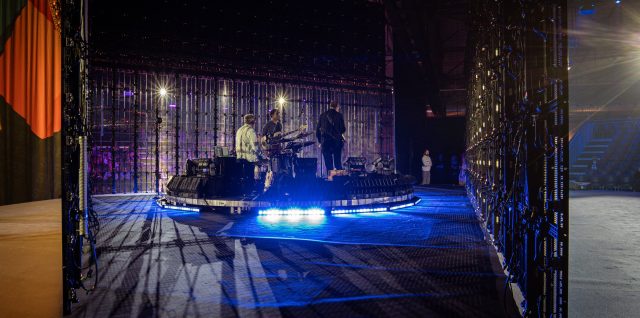
INFiLED Hololight Series transparent LED on the VOICES 2026 stage in Germany, with the band and audience visible through the open LED strips.

Hololight Series at VOICES 2026 in Germany.

The Layering Playbook: Solid Upstage, Transparent Downstage

The most reliable layered stage design places a solid, high-resolution screen at the back and a transparent layer in front of it. The solid screen carries the detail. The transparent layer adds foreground motion, and the performer stands between or behind the layers, depending on the moment.

Three principles make this work.

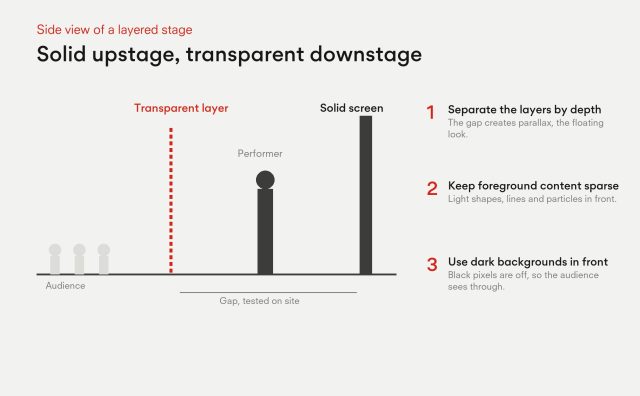
  1. Separate the layers by depth. A gap between the transparent screen and the solid screen lets each layer read as its own surface. The difference in apparent movement between the layers, called parallax, is what gives the look of floating, holographic imagery. Test the gap on site, since the right spacing depends on audience distance and camera position.
  2. Keep foreground content sparse. Bright, dense imagery on the front layer covers the performer. Use light shapes, lines and particles in front, and reserve full-frame video for the solid layer.
  3. Use dark backgrounds on the transparent layer. Black pixels are simply off, and the audience sees straight through them. Content built with lots of black feels transparent. Content built with full-frame colour fills the gaps visually and defeats the point.

INFiLED’s work on the Eurovision selection stage UMK2026 followed the same logic. The UMK2026 stage design paired a 21 by 7 metre solid ARmk2 upstage screen with a 70% transparent overhead cube that lowered onto the stage, so cameras could shoot outward from inside the structure.

Side view of a layered stage: audience, transparent LED layer downstage, a gap tested on site, performer, solid LED screen upstage. Separate the layers by depth, keep foreground content sparse, use dark backgrounds in front.

Keeping Performers and Lighting Visible

The best test of a transparent LED stage design is whether the show can be lit and filmed as if the screen were not there. Several decisions decide that.

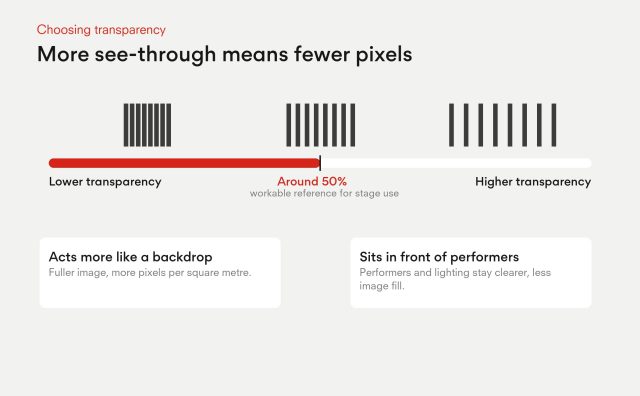
Transparency level: Higher transparency keeps performers and lighting clearer but reduces image fill. A figure around 50% is a workable reference point for stage use, balancing see-through with a recognisable image. Choose higher transparency when the screen sits in front of performers, and lower when it acts more like a backdrop.

Transparent LED trade-off: higher transparency means fewer pixels; around 50 percent is a workable reference for stage use; lower when the screen acts as a backdrop, higher when it sits in front of performers.

Light paths: Moving lights can shine through the openings, but beams also catch on strips and frames. Plan beam angles during design, not on load-in day. Haze makes beams visible, so agree how it interacts with the screen with the lighting designer early.

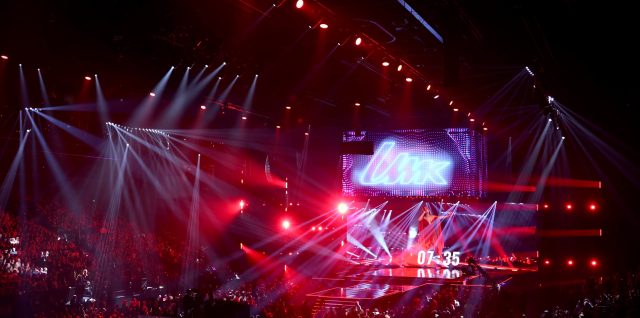
Moving light beams on the UMK2026 stage in Finland with INFiLED ARmk2 and AMT Series screens

UMK2026 stage in Finland. Photo: Akun Tehdas.

Camera behaviour: Cameras see gaps differently from eyes. Black-faced modules help on camera, and the UMK2026 build used them for that reason. Check refresh rate and scan settings with the broadcast team before locking the design.

Front and back views: Audiences at the sides and rear see the structure from angles the front seats never do. Review sightlines from the worst seat, not only the best one.

Eventbrite’s guide to event stage design makes a useful general point here: choose the layout and configuration first, because arena, thrust and in-the-round stages each change which audience sees which layer.

Curves, Rigging and Weight

Curved builds are where transparent LED stage design becomes physical. A gentle curve wraps the audience and adds depth. The details matter: the curve angle available per joint, how the screen is hung or stacked, and what the total load is on the truss.

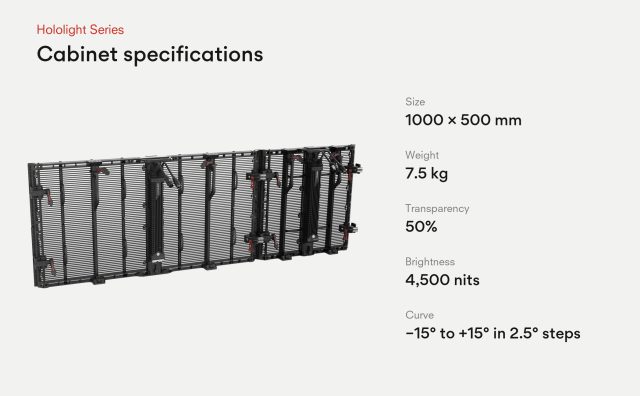
The Hololight series from INFiLED is specified for this kind of work. The Hololight transparent LED cabinet is 1000 by 500 mm, weighs 7.5 kg, offers 50% transparency and 4,500 nits, and curves from minus 15 to plus 15 degrees in 2.5 degree steps. It also pairs with the AP Series, so transparent and solid sections can be combined in one visual setup on one processing chain, which suits the solid upstage plus transparent downstage approach.

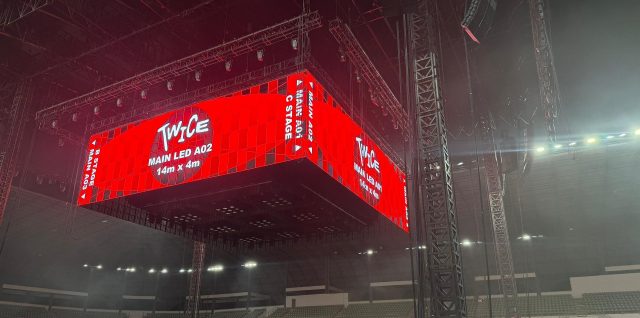
Weight is the number to watch. A cabinet at 7.5 kg keeps the load per metre manageable, but a 17 by 5 metre face still adds up. The TWICE Malaysia concert used 340 square metres of Hololight panels in a cube configuration, installed in five hours, which shows that lightweight cabinets can shorten build times as well as reduce rigging loads. Always confirm truss capacity and rigging points with the structural engineer.

INFiLED Hololight Series transparent LED cube hung over the stage at the TWICE concert in Malaysia

Hololight Series cube at the TWICE concert in Malaysia.

People also ask about lifespan. LED lifetimes are typically quoted in the tens of thousands of hours, but real life depends on brightness settings, heat and handling. For touring work, careful transport and cabinet protection matter as much as the LED rating.

Designing With the Screen, Not Around It

Good transparent LED stage design starts with the show and ends with the specification. Decide what the audience should see first, place the solid layer for detail and the transparent layer for depth, then choose a transparency level that leaves performers and lights unharmed. Test content with black backgrounds, review sightlines from the worst seats and confirm rigging early.

INFiLED’s approach to stage projects is to treat the screen as one element of a system alongside truss, lighting and cameras. When the layers, the light paths and the load are planned together, transparent LED does what it should: it lets the visuals and the performers share the same space.

User registration
Join us to download our content. It only takes a moment!

    I have read and accept the privacy policy

    This site is protected by reCAPTCHA and Google.

    It looks like you are visiting the website from
    Select your region: