Confirm

How to Create Content for an LED Video Wall: Resolution, Aspect Ratio and Safe Zones

23.09.2026

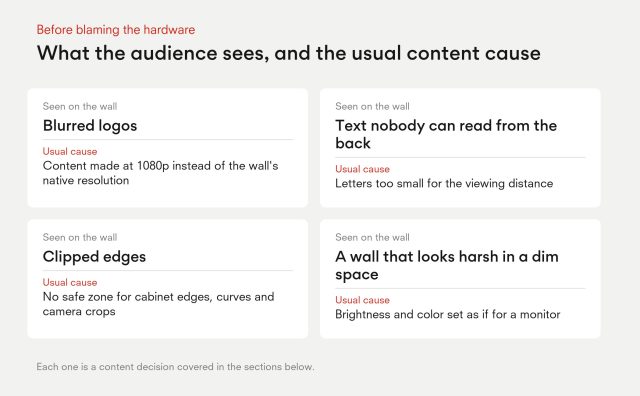
Most conversations about LED walls end when the cabinets are installed, yet many disappointing walls fail on the content side. Blurred logos, text nobody can read from the back of the room, clipped edges and a wall that looks harsh in a dim space are usually content problems, not hardware faults. The common misunderstanding is that a wall is simply a large screen that accepts a 1080p file.

It is a custom pixel grid with its own shape, brightness and color behaviour. This guide explains how to build content for an LED video wall around that grid: native resolution, aspect ratio, safe zones, type size, color and motion, plus a checklist to run before the show.
Start with Native Resolution, Not 1080p

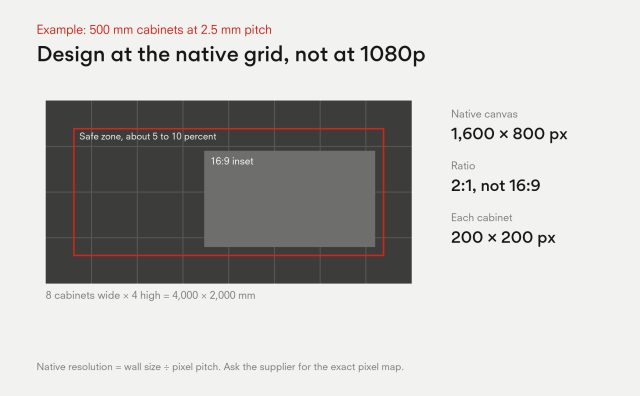
Native resolution is the wall dimension divided by the pixel pitch. Take 500 mm cabinets at a 2.5 mm pitch: each cabinet is 200 pixels across and 200 high. A wall eight cabinets wide and four high measures 4,000 by 2,000 mm, which is 1,600 by 800 pixels. That is not a 1080p canvas, and it is not 16:9.

Size and pixel count are separate things. A 16 metre wall at a 10 mm pitch is only 1,600 pixels wide, fewer than a desktop monitor. Content built at the native grid avoids scaling, which softens edges and adds artefacts. As the Show Tech resolution glossary notes, even when standard video is scaled to fit, graphics and titles should be designed at the native wall resolution for maximum sharpness. INFiLED’s advice is to request the exact pixel map from the supplier before the creative team starts, since the figures in LED video wall specifications that actually matter and how pixel pitch impacts viewing distance, cost and image quality feed directly into it.

Native canvas for an LED wall of 8 by 4 cabinets of 500 mm at 2.5 mm pitch: 4,000 by 2,000 mm, 1,600 by 800 pixels, 2:1 ratio, each cabinet 200 by 200 pixels, with a 5 to 10 percent safe zone and a 16:9 inset.

Non-Standard Aspect Ratios and How to Build a Canvas

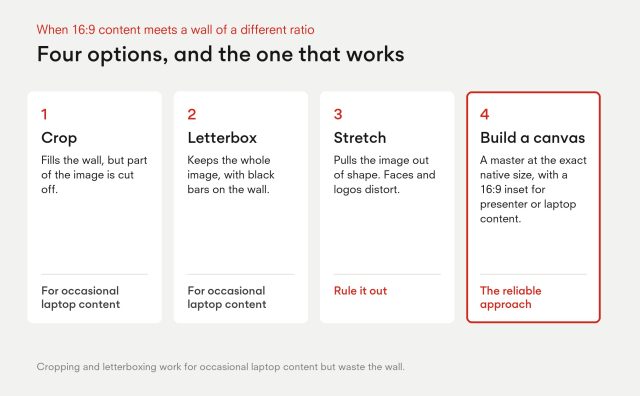
LED walls scale to almost any proportion, so the 2:1 wall above is ordinary. When 16:9 content meets a wall of a different ratio there are only four options: crop it, letterbox it, stretch it, or build a canvas that fits. Stretching distorts faces and logos and should be ruled out. Cropping and letterboxing work for occasional laptop content but waste the wall.

The reliable approach is to build a master canvas at the exact native size in the editing software. Add guides for cabinet edges, curves and any gaps, then place a 16:9 inset for presenter or laptop content so the two formats coexist. Export one master and, where needed, a fixed inset version. Walls split across several processor outputs need the same care, so agree the mapping and the canvas layout with the operator in advance.

Text, Contrast and Safe Zones: Sizing Type for Viewing Distance

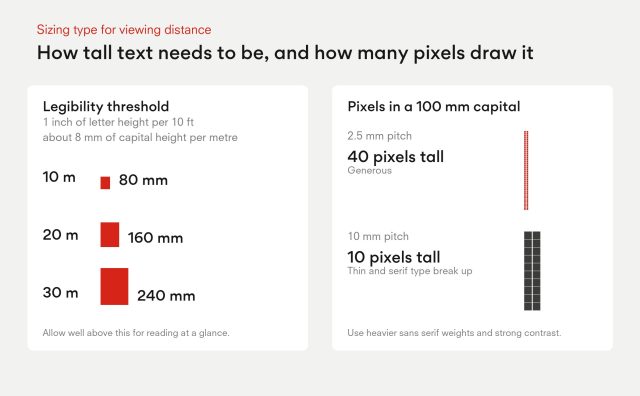
A common signage rule of thumb ties one inch of letter height to ten feet of viewing distance, as Signs.com sets out. In metric terms that is roughly 8 mm of capital letter height per metre. It marks the threshold of legibility, not comfortable reading, so allow well above it for anything the audience must absorb at a glance.

On LED there is a second check: how many pixels build the letter. At a 2.5 mm pitch, a 100 mm capital is 40 pixels tall, which is generous. At 10 mm it is only 10 pixels, and thin or serif typefaces start to break up. Use heavier sans serif weights, avoid hairline strokes and keep strong contrast between text and background. INFiLED’s guidance to creative teams is to test the smallest text on the real wall, at the real distance, before final export.

Safe zones protect key content from cabinet edges, curves, stage scenery and camera crops. Keeping logos and text inside a margin is standard broadcast practice, and a margin of around 5 to 10 percent is a reasonable starting point, adjusted after a walk-through.

Letter height for LED walls: about 8 mm of capital height per metre of viewing distance, 80 mm at 10 m, 160 mm at 20 m, 240 mm at 30 m; a 100 mm capital is 40 pixels tall at 2.5 mm pitch and 10 pixels at 10 mm pitch.

Color, Brightness and Motion: What Looks Different on LED

An LED wall can emit many times the light of a monitor. Large pure white fields feel harsh at close range and wash out surroundings in a dim room. They also cost energy: Barco’s analysis of LED wall power consumption shows that typical content draws only a fraction of the configured power, and that white-heavy content pushes the average higher. Darker palettes are easier on eyes and on the electricity bill.

Color needs the same care. Design in a standard color space, then check on the wall itself, because LED gamut and calibration differ from the design monitor. Why color accuracy matters more than brightness and how LED panel calibration affects long-term image consistency explain what to expect.

Motion has its own rules. Match the content frame rate to the playback system and, when cameras are involved, to the camera setting, whether 24, 25, 30, 50 or 60. Single-pixel lines and fine patterns can shimmer or produce moiré on camera, so use heavier strokes. Broadcast studio LED walls: how to eliminate flicker, moiré and camera issues goes deeper, and choosing the right LED video wall for hybrid events covers livestream content.

A Pre-Show Content Checklist

  1. Confirm the native resolution and pixel map with the supplier and the processor operator.
  2. Export at native resolution, with a master canvas and safe-zone guides.
  3. Run test patterns: a gradient for banding, a grid for alignment, and white and black fields for uniformity.
  4. Set the content frame rate to match playback and any cameras.
  5. Confirm the file format and codec play smoothly on the media server, using the longest and heaviest file.
  6. Check the smallest text at the farthest viewer distance on the wall itself.
  7. Review the palette at show brightness in the room’s real lighting.
  8. Keep a backup of the content and a fallback loop ready.

Content that is built to the wall almost always looks better than expensive content forced onto it. For a specialist format that depends on precise geometry, see how to design high-impact 3D LED billboards. For strategy rather than production, retail LED displays that drive sales covers what to show and why. INFiLED sees the same pattern across venues: walls that were handed a pixel map early are the ones that look finished on opening night.

User registration
Join us to download our content. It only takes a moment!

    I have read and accept the privacy policy

    This site is protected by reCAPTCHA and Google.

    It looks like you are visiting the website from
    Select your region: